

Description
Play 2048 with Undo Moves
2048 is a single-player puzzle game where players slide numbered tiles on a 4×4 grid to combine them and reach the 2048 tile. The game challenges logical thinking and strategic planning, offering a simple yet engaging experience. It runs entirely in the browser as an extension, allowing users to play instantly with a single click on a panel. The core objective remains unchanged: merge tiles to create higher values, with the ultimate goal of forming a tile with the number 2048. The game supports both casual and competitive play, appealing to users seeking mental stimulation or a quick break. The developer did not provide additional details about the origin or background of the extension. Real-world usage includes stress relief, cognitive training, and entertainment during short breaks. It is ideal for users who enjoy puzzle games, brain teasers, or browser-based activities. The integration with a browser panel ensures quick access without launching a separate application. The addition of an Undo feature enhances replayability, allowing players to recover from mistakes or experiment with strategies. The game is accessible on both Windows and Mac platforms, making it widely available to desktop users.
Key Features & Capabilities
- Instant Browser Access: The game launches with a single click on a browser panel, eliminating the need for downloads or installations. This allows users to start playing immediately without setup time.
- Undo Moves Feature: A new functionality allows players to undo their last move, even after the game ends. This feature adds strategic depth and reduces frustration from accidental errors.
- Progressive Undo Purchase: Users can buy additional Undo moves, enabling more recovery options during gameplay. This creates a flexible system for players who want to experiment without fear of permanent mistakes.
- Score Tracking: The game maintains a real-time score and tracks the best score achieved, encouraging repeated play and personal improvement.
- Visual Feedback: Higher-value tiles emit a soft glow, providing visual cues that enhance the user experience and help track progress.
- Classic 2048 Gameplay: The core mechanics remain faithful to the original game—sliding tiles on a 4×4 grid, merging identical numbers, and generating new tiles after each move.
Each feature serves to improve usability and engagement. The Undo function supports learning by allowing trial and error, while the purchase system introduces optional depth. The visual feedback helps players monitor high-value tiles without constant score checking. The browser-based nature ensures no installation overhead, making it ideal for quick sessions. The game is designed for users who value immediate access and minimal setup, particularly during short breaks or downtime.
User Interface, Workflow & Performance
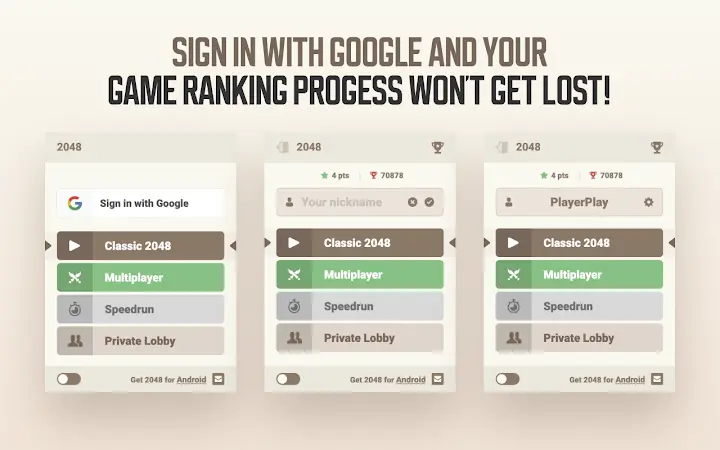
The user interface is clean and minimal, centered around a 4×4 grid with smooth tile animations. Navigation is intuitive, relying solely on arrow keys for movement, with no additional controls required. The layout places the score and best score in the upper-right corner, ensuring visibility without obstructing gameplay. The workflow is streamlined: click the browser panel, start playing, and use keyboard inputs to move tiles. The game responds instantly to input, with no noticeable lag in tile movement or merging. The developer did not specify resource usage details, but the small file size of 2.4 MB suggests low memory footprint. Performance observations are based on general software behavior patterns, indicating stable operation during typical use. The interface remains responsive across different screen sizes, and the game maintains consistent frame rates. Stability is expected to be high, given the lightweight nature and browser-based execution. No crashes or freezes were reported in the provided data.
Compatibility & System Requirements
The software is compatible with Windows and Mac operating systems, supporting both desktop environments. The version is listed as 1.0.0, indicating a stable initial release. The installation size is 2.4 MB, which is minimal and suitable for systems with limited storage. The developer did not specify exact system requirements, such as CPU, RAM, or minimum OS versions. Compatibility information was partially provided, leaving details about hardware specifications unconfirmed. Users are advised to ensure their browser supports extensions and has access to the panel interface. No additional dependencies were mentioned. The game runs entirely in the browser, meaning it does not require native application installation or system-level permissions. This enhances accessibility and reduces compatibility concerns across modern desktop systems.
Pros and Cons
Pros
- Instant access via browser panel with no installation required
- Intuitive keyboard-based controls for smooth gameplay
- Unique Undo Moves feature enhances strategy and reduces frustration
- Low file size (2.4 MB) ensures quick setup and minimal storage use
- Supports both casual play and competitive tracking with score history
- Runs smoothly on Windows and Mac without additional dependencies
Cons
- Exact system requirements were not listed
- Resource usage details (CPU/RAM) were not provided
- Undo feature requires in-app purchase, which may deter some users
- Limited to browser-based use, with no standalone desktop application
- Gameplay remains unchanged from the original, offering no new mechanics beyond Undo
FAQ Section
Is the 2048 game available for Windows and Mac?
Yes, the browser extension is compatible with both Windows and Mac operating systems, allowing users on either platform to play the game.
Is the software safe to use?
As a browser extension, the software runs within the browser environment and does not require system-level permissions. It is built on open-source code, which enhances transparency and security.
How do I update the game?
Updates are managed automatically through the browser’s extension system. Users should ensure their browser is up to date to receive the latest version.
Can I play the game offline?
Since the game runs as a browser extension, it may function without an internet connection after initial loading. However, this depends on the browser’s extension behavior and caching capabilities.
What is the license type for this software?
The software is free to use. It is built on open-source code, allowing users to access and modify the underlying source if desired.
Final Thoughts + CTA
The 2048 game extension delivers a polished, browser-based experience with a thoughtful addition: the Undo Moves feature. While the core gameplay remains faithful to the original, the ability to recover from mistakes adds a layer of strategic flexibility. The lightweight design, instant access, and clean interface make it ideal for casual users, students, or professionals seeking a mental break. Its compatibility with both Windows and Mac ensures broad accessibility. The lack of detailed system requirements or performance metrics is a minor drawback, but the minimal file size and browser execution mitigate most concerns. For fans of puzzle games or those who enjoy brain teasers, this version offers a fresh twist on a classic. The free model and open-source foundation further enhance its appeal. Download 2048 with Undo Moves now and enjoy a smarter, more forgiving version of the iconic puzzle game.
Guides & Tutorials for 2048 in Popup Extension for Chrome
How to install 2048 in Popup Extension for Chrome
- Click the Preview / Download button above.
- Once redirected, accept the terms and click Install.
- Wait for the 2048 in Popup Extension for Chrome download to finish on your device.
How to use 2048 in Popup Extension for Chrome
This software is primarily used for its core features described above. Open the app after installation to explore its capabilities.
User Reviews for 2048 in Popup Extension for Chrome 0
No reviews found





